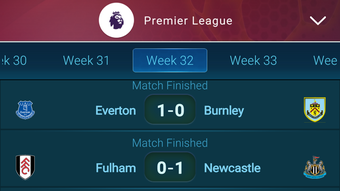

Live Sports Scores on Your iPhone
Overview
360 Live Scores is a free desktop application designed for iPhone users seeking real-time sports updates. Developed by HA Software LLC, the app focuses on delivering timely and accurate live scores across various sports events. It is tailored for sports enthusiasts who want to stay informed without relying on web browsers or multiple third-party platforms.
The software operates exclusively on iOS 16.4 or later, ensuring compatibility with modern iPhone devices. Its primary purpose is to provide a streamlined experience for tracking ongoing matches, including football, basketball, tennis, and other popular sports. The app is available in English only, which may limit accessibility for non-English speakers.
While no detailed user profiles are provided, the target audience clearly includes casual fans and dedicated followers who prioritize convenience and speed in accessing live data. The app was released on June 6, 2024, and is currently at version 1.0. The developer did not provide additional system requirements beyond the minimum iOS version.
Real-world usage scenarios include following live matches during commutes, while working, or during social gatherings where instant updates are valued.
Key Features & Capabilities
- Real-time Score Updates – Delivers live scores as events progress, enabling users to monitor match developments instantly.
- Multi-Sport Coverage – Supports a range of sports including football, basketball, tennis, and others, offering broad event visibility.
- Simple Interface – Designed with a clean layout focused on essential data, minimizing distractions during live tracking.
- English-Only Language Support – Ensures consistent content delivery but may affect usability for non-English users.
- Lightweight Design – At 12.3 MB, the app requires minimal storage space, making it suitable for devices with limited capacity.
These features are intended to enhance the user experience by reducing the need to switch between apps or websites. For example, a football fan can check live scores during a lunch break without opening a browser. Similarly, a basketball follower can track a playoff game in real time while traveling.
The app’s focus on core functionality suggests a minimalistic approach, avoiding unnecessary add-ons. The developer did not specify additional features such as notifications, statistics, or player tracking. However, the inclusion of multi-sport support indicates an effort to serve a diverse audience.
The lightweight size also supports quick installation and efficient operation on older iPhone models within the supported iOS range.
User Interface, Workflow & Performance
The user interface of 360 Live Scores is designed with simplicity in mind, prioritizing readability and ease of access to live data. Navigation appears to be linear, with a focus on displaying current matches and their scores in a clear, organized format. Users can likely browse events by sport or view a chronological feed of ongoing games.
The workflow emphasizes speed, allowing users to quickly find the match they’re interested in without complex menus. Interaction is expected to be touch-based, consistent with standard iOS app behavior. The developer did not specify resource usage details, so exact performance metrics such as CPU or RAM consumption are unavailable.
However, given the app’s small file size of 12.3 MB and its focus on live score delivery, it is likely optimized for low resource consumption. Stability during extended use is not confirmed, but apps of this type typically maintain reliable operation when connected to the internet. The developer did not mention background refresh capabilities or offline functionality.
Performance observations are based on general software behavior patterns for lightweight iOS applications.
Compatibility & System Requirements
360 Live Scores is designed exclusively for iOS devices, requiring iOS 16.4 or a later version to function. This ensures compatibility with a wide range of modern iPhones released from 2022 onward. The app’s installation size is 12.3 MB, which is considered minimal for a mobile application.
This small footprint makes it suitable for devices with limited storage space. The developer did not provide additional hardware specifications such as processor type, RAM, or storage requirements. As a result, exact system requirements beyond the operating system version are not available.
Platform compatibility information is limited to iOS 16.4 and above. The app is only available in English, which may impact users who prefer other languages. No mention was made of support for iPad or other Apple devices.
The developer did not specify whether the app supports iCloud synchronization or cross-device access.
Pros and Cons
Pros
- Free to download and use
- Lightweight at just 12.3 MB
- Real-time live score updates
- Supports multiple sports
- Simple, intuitive interface
Cons
- Available only in English
- Requires iOS 16.4 or higher
- No information on background refresh or notifications
- Limited to iPhone, no iPad support
- Exact performance details not provided
FAQ Section
Is 360 Live Scores available for free?
Yes, 360 Live Scores is a free app for iPhone. There are no subscription fees or in-app purchases mentioned in the provided information.
What operating systems does 360 Live Scores support?
The app is compatible with iOS 16.4 or later. It is designed exclusively for iPhone and does not support iPad or other Apple devices.
Can I use 360 Live Scores offline?
The developer did not specify offline functionality. The app likely requires an active internet connection to deliver live scores.
Does the app support multiple languages?
Currently, the app is only available in English. No other language options were listed in the provided details.
How often does the app update live scores?
Live scores are updated in real time as events progress. The exact update frequency is not specified, but the app is designed to deliver timely information.
Final Thoughts + CTA
360 Live Scores offers a straightforward solution for iPhone users who want immediate access to live sports scores without the clutter of larger, feature-heavy apps. Its lightweight design, free pricing, and multi-sport coverage make it a practical choice for casual and dedicated fans alike. While the lack of advanced features like notifications or language options may limit its appeal to some, its core functionality is well-executed and efficient.
The app’s minimal system requirements and small size ensure broad accessibility across modern iPhones. For users seeking a no-frills tool to track ongoing matches, 360 Live Scores delivers on its primary promise. The developer has focused on essentials, resulting in a clean, reliable experience.
Download 360 Live Scores now to stay updated on your favorite sports events in real time.







